Tuesday, March 24, 2015

EdCamp Evolution

When looking at my #EdCamp evolution in the five EdCamps that I have been to it is a simple axiom, discussions are the BEST!

I really enjoy the discussions during “sessions” because you can learn from everyone in the room.  We I am leading a session, I try and pose a question to get a discussion started.  I don’t want to be the center of attention and I want to learn in the session I am leading as well.  I know that I am no expert, but I know the people around me have more experience with the topic and I want to learn from them.

If I go to an EdCamp and find myself in a session in which I don’t like the way the discussion is going or some is presenting rather than leading, I get up and walk out.  That is the beauty of an EdCamp.  Vote with your feet and learn what you want to learn.  

There are even sometimes when the best session isn’t a session at all.  It is those conversations in the halls or on the ride to and from the EdCamp that “problems of the world” are solved. (Shout out to Mickie Mueller on that one!)  

Another part of my evolution I would say are the connections that I have made.  People I just know on Twitter and finally meet face-to-face or even those that you are meeting for the first time anywhere.  It is alway nice to be able to network with new people and expand my PLN.  There are even people you only know or call them by their Twitter “handle”.  (Toby Brown and Laura Kroll shout out there.)

A final thought: If you haven’t been to an EdCamp, why not?  It will be well worth your time, you will meet some really GREAT people, and you will come away energized.  As always, if you are in the Columbus, Nebraska area and I am going to an EdCamp, Omaha or Central Nebraska, I will drive!

Wednesday, October 15, 2014

BrightBytes Summit 2014

Last week I had the opportunity to spend two wonderful days in San Francisco at the BrightBytes Summit 2014.  Educator from all over the country, us 15%ers, spent two days discussing various ways to “fill our suitcases” for student success.  (When I referr to the 15%ers, it is the 15% of BrightBytes users).  We filled those suitcases with the 3T’s: Team, Tools and Tactics.  

We had the opportunity to hear from several speakers such as Richard Gerver, Bruce Dixson, Will Richardson and many more.  Listening to these speakers talk about educational issues of today and what we can do to help students succeed was inspirational.

One point made by the keynote Richard Gerver was that we should be creating individuals that don’t need managing.  These are those in the workforce that don’t need to be told how to do every step along the way.  They are the go getters and they only go to “management” if there is a problem that needs to be solved that is “above their pay grade”.  This leads to another point of Richard’s that I found interesting: we should be focusing on HOW to learn rather than on WHAT to learn.  If we can do this, we will create those individuals that don’t need to be managed.

On day two, there were a couple of points made by Will Richardson that stuck with me as well.  First, we need to leave all the adjective in front of learning off and just call it LEARNING!  To me, in the end, that is what it is all about!  The second point that stuck with me was professional development is now up to the professional, NOT the institution.  There are so many opportunities out there for teachers to improve themselves with like-minded individuals outside of the four walls of the school building.  From Twitter to EdCamps, all one needs to do is just look and find what they need.

There was so much more that I gained from this experience that I don’t have enough room, or want to drag on about, in this post.  I know that I won’t forget the time I spent at the Summit and cannot wait to go back in the future.  All the collaboration and communication that took place was invaluable!

Friday, August 29, 2014

Classroom Design: Change the Learning Environment

I have been wondering lately what should a classroom today look like?  Should we still have desks and tables in rows with the teacher in the front of the room?  

At ISTE this year I spent some time in the exhibit hall talking to furniture companies looking at different types of tables, desks, chairs, and more.  I am trying to reimagine the classroom in a technology rich environment.  What would that actually look like?  What could a blended/flipped classroom look like?  Do we still have desks and chairs in rows?

I have many ideas floating through my head of what a blended classroom looks like.  The only problem that I see of fulfilling some of my visions is money.  That is the really big issue with every district.  My vision is to have a classroom that has a variety of learning environments in one classroom.  A classroom that is not set up a traditional way.  A classroom that is arranged for student learning!  This type of classroom may look different to you than it does to me.  However, it will accomplish the same goals.  The classroom can be arranged differently from day-to-day, unit-to-unit, quarter-to-quarter or minute-to-minute.  The possibilities are as endless as your imagination.  

Why should we keep our learning environments the same as they were 100 years ago.  Learning is done in different ways now, why should we not encourage that type learning?  This not only goes for students, but for us as adult learners as well!  I want to have the ability to make the learning environment the best for the learner.  Why don’t we do that in our classrooms? Why do we have to have desks in neat rows?  Why not beanbags, couches, tall tables, moveable tables that are white boards, movable partitions, and more.  

What would you do to redesign your classroom if money was not limited?

Monday, July 7, 2014

ISTE 2014 Reflection

I have now had a couple of days to reflect on ISTE2014 in Atlanta.  One thing that ISTE makes me do is think about new ideas and rethink old ideas.  This is a good thing for me, as it should be for everyone from time to time.  If you don’t reflect on what you are doing, how are you going to get any better at what you do!

Most of the information that I gleaned from ISTE came from poster sessions.  This gives a person an opportunity to see over 40 different presentations in the same amount of time that you could see just two lecture sessions.  It also allows you to see students presenting what they are doing in their own schools with technology in a variety of ways.  Don’t get me wrong, there are some good lecture sessions, but for the time poster sessions are the way to go!

Another great part of ISTE is the networking.  Connecting with those that you already know and meeting new people to add to a PLN.  This was the case for me.  I connected once again with those that I already knew, those I only knew through twitter, and met MANY new people.  Part of the reason I met so many new people was having the opportunity to present a poster session with Beth Kabes from ESU7 and Kristina Peters from NDE.  We saw over 70 people in two hours!  We shared what we are doing at ESU7 and in Nebraska with BlendEd and Blended PD.  We talked with people from five countries outside the US!  This is truly an International conference!  All three of us are now hooked on presenting poster sessions at ISTE!

If you ever have the opportunity to attend ISTE, you should!  If you are in Nebraska and don’t want to travel to Philadelphia for ISTE2015 all you have to do is wait until 2016 in Denver.  I don’t have enough time or space to tell you all about the trip.  However, you may be seeing some posts come up in the future about my new ideas or rethink of old ideas.  It is great blogpost fodder!

Friday, April 11, 2014

ASOT and Technology

Just last week, I spent two days in the final days of Marzano Academy 13-14.  It was a wonderful six days of learning about “The Art and Science of Teaching”.  Tammy Heflebower and Phil Warrick do a wonderful job of conveying the information for everyone involved.  

I have also just recently finished reading “Enhancing the Art and Science of Teaching with Technology” by Sonny MagaƱa and Robert Marzano.  Which took ASOT and talked about how technology could be used to make implementing the nine design questions easier in the classroom.

Stacy Behmer and I will be presenting a session at NETA 14 in a couple of weeks called “Google Apps Meets Marzano”.  We will be talking how GAFE can be used with each of the nine design questions(Don’t want to give too much away).  There are many more ways that technology can be “hung” (thanks to Phil Warrick for that term) within the ASOT.  

There are two examples that I will share with you that Rick Williams from ESU2 and I talked to the Academy participants about this last week.  The first is Kahoot (getkahoot.com) which is a web-base, FREE, game.  Teachers or students can create their own quizzes.  They can set a time limit and then give points for speed and accuracy.  Those that are taking the quiz go to kahoot.it and put in a pin number for the quiz/game.  After each question, it gives the correct answer and then the top 5 in the standings.  Each participant will know where they stand on their device as well.  This activity works well for formative assessments as you are able to correct misunderstandings after each question.

The second app we talked about was Class Dojo (www.classdojo.com).  See my previous post on Class Dojo. As it turned out, the week before the Academy, Class Dojo came out with an update.  In the update, on the app only, you are able to message parents.  Teachers can either do a group message to all parents or to each individually.  If parents reply, to either type of message, it is only between the parent and the teacher.  This is a great way of communicating with the parents on the behavior of their child in the classroom.  Phone numbers and emails are kept confidential.  Class Dojo is a great way to keep students accountable for their actions in the classroom, setting and maintaining high expectations, and keeping students on task.

I am now looking forward the the 14-15 Marzano Academy which will be starting this June.  I know that it is already full with teams from schools around Nebraska.  I am sure I will gain more information that I even learned in this Academy.

Friday, March 14, 2014

Clarity Reflection

ESU7 is just about done with the first cohort of the Clarity survey from BrightBytes, and a second cohort has just started.  As I have been looking at the data from an ESU-wide level, and at the district level there are some things that concern me a little.  I am finding some changes that need to be made in the trainings and workshops that I offer to the teachers and administrators of ESU7.


I really like the data that I am getting from these surveys.  I am realizing that from the classroom standpoint that teachers and students are needing some help in the 4C’s area (communication, collaboration, critical thinking, and creativity).  These are the skills that students are needing to succeed in the world today.  I at least have an idea of how I can change my trainings to model the 4C’s so they can take that back to their schools and improve in this area.


Another area for needing improvement is Student Digital Citizenship.  I think that this area is always going to be needing improvement.  There is so little time in the day to teach this to students that it gets left behind.  I am helping a school out with a technology bootcamp and discussing digital citizenship with their students.   I am sharing the digital citizenship results with those students from their Clarity survey.  Of the four questions that were asked, I am covering three of them in my presentation.  Maybe students just need to hear about this from someone other than teachers that they see every day for it to make an impact.


The last area that I am going to talk about is Professional Learning.  Why would I be talking about this?  Teachers are saying they get technology PD from their district during the year.  It is the willingness of teachers to go to workshops, trainings, edcamps, twitter, etc on their own time that isn't sponsored by their school or when they are off contract time.  If we don’t do this, how are we modeling what we are preaching about being lifelong learners to our students.  I like to promote those gatherings that fit the “off contract” time PD.  Edcamps, summer workshops, summer conferences, twitter chats and more.  I will keep doing this as long as I can because it is a valuable experience for teachers to connect with others outside their district.  I have even said in the past and will continue to say: if I am going to an EdCamp (Omaha or Central Nebraska) I will drive from Columbus if anyone wants to meet me here!  The offer is open when I go to EdCamp Omaha on March 22nd, and I still have PLENTY of room! Also, if you are on my way, I will stop and pick you up!

Finally, a huge thanks to BrightBytes for Clarity.  They are very easy to work with and willing to help you in any way that they can.  If you haven’t heard of them until now, you need to check them out. Also see this Hanging with ESU7 episode talking about Clarity.

Friday, March 7, 2014

Digital Citizenship

I have had the privilege of talking to some students at a school in ESU7 about digital citizenship for a bootcamp they are having before they roll out their own 1:1 computer initiative for the fourth quarter. I have seen four of the six classes that will be getting the computers on Tuesday night.  I have gone into the session telling them that my goal is to scare the daylights out of them.  I may accomplish this goal with some of them, and with some I may not.  But if I make them rethink what they are doing, then I have accomplished something.

I am talking very matter of factly with them in regards to sexting, online predators, cyberbullying, and creating that digital footprint they would be proud of.  It is a serious topic and there may be some topics that they don’t want to talk or hear about.  But it needs to be done.  (Side note: this is one of the schools in ESU7 that took the Clarity survey and student digital citizenship was a category that was low.)  I am sharing information with them that I will also be sharing with their parents at a Tuesday night parents meeting.  I am letting them know that I will be telling their parents to be asking questions about their online habits.

I know I have reached some students already.  I have had them tell me themselves in front of their classmates that they are doing some of the things that I am talking about and they need to change.  To me that is a #eduwin already, and I am not even done.  

These talks need to be had with students.  If teachers in the district are talking about it, some kids may just tune out.  That means it is time to bring someone else in.  I am being VERY honest with these students.  I will also be very honest with the parents.  I have shared some experiences of my own.  Let them connect to me a little as well.  I also try to add a little humor to a serious topic.  

Get to your point Otis!  That is probably what you might be thinking right now.  I think that I have several points in this post.  First, teaching of digital citizenship is important.  We all know that. But the teaching of the topics that students may not want to hear about and the facts associated with those topics will open their eyes to what they are doing.  Second, I am enjoying teaching students again.  I never lost that when I moved into this job two years ago.  But there are time I need a “kid fix”/”classroom fix” and this is filling that.  To know that I have reached someone and will be changing the way they act online makes me feel good!

Here is to creating good digital citizens with a positive digital footprint!

Friday, February 14, 2014

Tech in the Kinder Classroom

This week I have another guest poster.  Wes Pokorny is a kindergarten teacher at Clarkson Public Schools in Clarkson, NE.   Wes integrates technology into his classroom as often as he can as a supplement to regular instruction.


When Otis asked me to be a guest blogger I was very excited!  When I told my kids they laughed at me because I do not even own a cell phone!  I may not have a cell phone but I have embraced technology in my classroom.  Those of you who do not know me, my name is Wes Pokorny and I teach kindergarten in Clarkson, Nebraska.  I have been at it for 19 years.  When I started out my computers had “floppy” discs and weighed 25 pounds.  Here is a little view how I am using technology in the classroom.

I am not doing anything cutting edge but I do try to get technology into the student’s hands daily.  From day one the kids are using ABCMouse.com in their small group reading stations.  It is free to public schools and is an outstanding way for kids to reinforce their reading and math skills.  I am able to format lessons for each student and monitor what they are working on.  We are lucky to have a MacBook Pro cart right down the hall and I can get 6 computers with ease.  I also use Starfall.com during our small group time.  Starfall.com is one of the best sights I have come across in my time teaching. 

Students also have access to iPads , which we use for reinforcement and practice.  We have all the apps that have been recommended by different folks on Twitter, Matt Gomez and some of his #kinderchat friends.  I am always looking for apps that force kids to use higher order thinking skills.  One such app is Kodable.  It is an app that introduces early elements of computer coding.  Cargo-Bot also does the same but is a little tougher for 5 and 6 year olds.

I personally use the iPad and an app called Splashtop Streamer as a remote control for my desktop.  It allows me to roam the room as I run our morning meeting or teaching various lessons.  If I want the kids to do some yoga I will use an application on my desktop called Reflector.   Reflector works with my iPad to put the app on my SMART Board so it is on a big screen.  I also use Reflector to show what the students are doing at their seats to the whole group.

I can’t even think of teaching without my SMART Board.  It allows me to be quite entertaining at times.  Yes, as teachers we must be entertaining in order to hold the students attention.  YouTube has so many interesting things to enrich our lessons.

This year I started preparing my lesson plans on Notability.  I like it because it also recognizes speech and turns it into type.  After I have the lessons I send them to Evernote.  Evernote is one sweet app.  I really like the ability to clip articles and save them.

We have used our Polycom cart to hook up with Santa and another class in Michigan.  This is something that I would like to do more of in the future.

Here is what is on the horizon for my students.  I am showing them how to use Explain Everything.  I am showing them how to take a photo and record their voice.  I then want to put their reading on YouTube so parents can listen to their progress. 

Like I said earlier I do not have a cell phone but I do have a Twitter account.  It has helped my professional development in many ways.  I try to look at technology with a “hybrid” mind a  little old school and some cutting edge. There will always be something new next week.  You have got to find a balance in your life.  How much time do you want to spend? Have you taken your students outside lately? Please make sure that your technology is not just babysitting your students. 


If you ever want to stop in and see what is happening in Clarkson feel free to give us a call and pop in!

Wednesday, February 5, 2014

Technology in the Spanish Classroom

A guest post talking about how to integrate some technology into the Spanish Classroom. This can even be done for any foreign language classroom. A huge thank you to Courtney Johnson for this post!

¡Hola! My name is Courtney Johnson and I am the Spanish teacher for East Butler Schools, located in Brainard. Being a world languages teacher offers a number of fun, useful, and exciting ways to use technology in my classroom to bring better language experiences to my students. Today, I will share 4 different ways that you can use technology in your world language classroom to create a more effective language learning environment.


1) Wordreference.com
If you have access to the internet and aren’t using Wordreference, you are making your life way harder than it needs to be. Wordreference.com is an online dictionary, grammar forums, and a verb conjugator all in one site. It is a great resource for language learners of all sorts. My favorite part is the forums, which can help you find that odd idiomatic expression or figure the difference between two similar words.


2) Youtube
If you’re someone who is trying to use authentic resources, Youtube is a goldmine. You can find commercials, songs, and sometimes even full length videos of shows in the target language. With Youtube’s addition of subtitles, using videos meant for native speakers is even easier! If you are a Spanish teacher, there is a fantastic set of videos by Agustin Iruela, aka Video Ele, that were created for the purpose of teaching Spanish. These videos are from Spain and are organized by the European proficiency levels, but feature a wide variety of situations. The presenters speak slowly and there are subtitles available for many languages. You can find these videos at http://www.youtube.com/user/papitus.


3) Google Apps
What is a tech list without Google Apps? Google has really created something special. The best part of Google Apps, for a foreign language classroom, is the collaboration. Students can work on projects together, explore and describe different cultures in your target language, they can write “letters” to each other… pretty much anything you can think of! Besides using the obvious Docs application for creating standard written artifacts, students can also create presentations online. Another fantastic app to use is Forms. Forms can be used in a few different ways. I’ve used in my classroom to conduct a class survey (in this case, opinions about classes in Spanish 1) and then we can talk about the results - all in Spanish! An example of our survey results can be found here: https://docs.google.com/forms/d/1oxJNFGrQaweF39H-rW1Qk-GpFWMlU-g1fGFDPPOoBX4/viewanalytics


Another way to use Forms is to create mini-quizzes for students. I wouldn’t trust it for a summative assessment (too easy to flip screens to google an answer,) but they’re perfect for a quick comprehension check. One way I have used it is by telling a story in Spanish and then using Forms for a “pop quiz” the next day to see how much students remembered. The data was just for me, but it was very helpful.


4) Animoto
Animoto is a website I chose to research for my technology course while working on my master’s degree. I ended up being so interested, I chose to use it in my classroom! Animoto is a web app that offers free educational accounts. It takes a bit of setup, but the results are fantastic. With Animoto, the user provides images, video clips, and captions after picking a pre-set theme and music. After choosing their items, the Animoto animation engine creates a unique video based on the input. I had my Spanish 3 students create a project about a Spanish-speaking actor, musician, writer, or other type of artist during our art unit. Something that I liked about Animoto is that the captions have a short character limit, so it forces students to use short, concise sentences that keep their language readable for all students, not just high achievers. You can find a student sample of this project here: http://animoto.com/play/Ewg2VQBoyiHFfra2vtG7Hw

Tuesday, February 4, 2014

Snow Day?

As I am sitting at home doing work on this snowy day, I am beginning to wonder with all the technology that is around are snow days obsolete?  With all the technology that is around I think that they can become a thing of the past.  Flipped classrooms, blended learning, learning management systems, and so much more to keep students and teachers in touch and learning on days such as this.

Let me state this before all of you start to put me on blast for the last paragraph.  There are still many access issues for students at home.  Just because you have the technology, doesn’t necessarily mean that you can use it on days like this.  Some students still don’t have access to those online materials and would be at a great disadvantage to those that do.  However, learning beyond the classroom can still take place on days like this.  If students are wanting to look ahead, get help on past assignments, get caught up from being gone.  They can still have access to their teachers.

I know that it is a shift in teacher thinking.  They want the snow day sometimes just as much as the kids do.  But as we try to move to a more blended approach to learning, we need to meet the students where they are.  It becomes a 24/7, anytime/anywhere learning situation.  Not only can this be used for snow days, but for students that must stay home because of sickness, doctors releases, or family reasons.

Some snow day, just have a twitter chat, a Google Hangout for virtual office hours, or a discussion online.  It might surprise you when more students show that they want to learn that way.

Thursday, December 12, 2013

Are they still "21st Century Skills"?

What is the first thing that comes to mind when you hear the phrase “21st Century Skills”?  I will bet it was technology skills.  If so, read on and you will find out they are so much more!

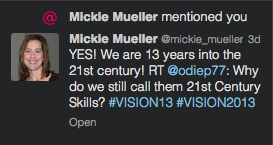
While at the ACTE VISION13 conference in Las Vegas this past week, I heard a lot about 21st Century Skills.  I posed the question on Twitter, “Why do we still call them 21st Century Skills?”  I got one response, but it made total sense.


I like the way that Mickie put it.  We are 13 years into the 21st Century, they are just skills that every student must have.  Not only for school and their career, but to be successful in life. I go back to the question at the beginning of this post and I will answer it myself in a different way.  To me the connotation of “21st Century Skills” is technology based.  But the skills that students need to be successful are more than technology skills.  Don’t get me wrong, technology skills are important, but so are many other skills that students need to be successful.  Collaboration, communication (verbal and non-verbal), critical thinking, and creativity don’t need technology.  Technology helps, but it isn’t necessary.

If you haven’t had a chance to look at the P21 organizations Framework for 21st Century Learning, you need to at least glance at it.  You can find it here.  This give you a good idea of the Skills that students need.

As for me, I am no longer going to refer to them as 21st Century Skills, they are now and forever more SKILLS.  If I happen to use this term, call me out and remind me of this post.  Take me to task, I am sure that I will deserve it.  

Thursday, November 14, 2013

The Common Core

I attended a workshop last week in Omaha about the Common Core State Standards (CCSS) from the Marzano Research Lab perspective.  I was confused about how the standards were organized, what they were saying and why they are the way they are.  In finding out the What and Why of the the CCSS helped me make more sense of them.  The standards may seem large and overwhelming, there are three parts, but only two of them are actually standards.  The third part is clarifying what can be done to achieve the standard.

The first part of the CCSS is the Anchor Standard.  Another term for this is the Culmination standard.  It is a K-12 Global Statement.  It is what all students in all grades should be aiming to achieve.  In English/Language Arts (ELA) there are 32 of these standards.  Ten each for reading and writing and six each for Speaking/Listening and Language.  In Math they vary per grade level and some carry over grade levels.  They are written differently than the ELA standards.  Overall in math there are eight standards for mathematical practice.

The next level of the standards in the ELA is Grade Level Standards(GLS).  These are the Benchmark standards.  What should students be able to do in each grade.  The final level in ELA is Clarifying Indicators.  These ARE NOT STANDARDS.  They are the details of how to better understand what is being asked in the Grade Level Standard.  The nuts and bolts of the GLS.

Prioritization is the key.  States and schools will need to decide what they want their students to learn to be college and career ready.    

I will be the first to admit that before this workshop, I was completely against having the CCSS in Nebraska. (Note: I was a part of the last revision of the Math Standards, so I have a “dog in the fight”.)  After two days of hearing about how the CCSS are organized, and all the resources that are out there I feel a little different.  Notice how I said “a little”, I am not completely sure that the entire CCSS is what Nebraska needs at this time or ever.  I do feel that in the next revisions, especially with the mathematics standards, that we need to look VERY closely at what the CCSS say in the math standards.  If we are expecting our Nebraska High School graduates to be college and career ready and able to compete with graduates from other states that have adopted the CCSS, we need to consider them in the revision of our Nebraska standards as well.  I still feel very passionate about Nebraska standards and state tests being written by Nebraska teachers.  Who better knows the students of Nebraska better than Nebraska teachers.

These are just my opinions and are open for discussion and debate. But I do feel, as stated earlier, that we at least need to consider some parts of the CCSS for Nebraska standards.  Maybe with some Nebraska “tweaks” to fit what we want to have our graduates College and Career Ready.

Wednesday, October 16, 2013

EdCamp Central Nebraska

Another wonderful day of FREE PD and networking has taken place.  EdCamp Central Nebraska took place at Grand Island High School this past Saturday.  About 50 people were in attendance for this very informative and fun day.  The Huskers game was followed on twitter using #Huskers.  It was nice to see a couple of other ESU7 teachers and even a student in attendance.  Craig Badura (@mrbadura) and Heather Callihan (@callihan) did a wonderful job planning this event.

The first part of the morning was spent planning the sessions.   If you wanted to present, you could, if not, you could participate.  One of the best parts of an EdCamp is the sessions are planned that morning.  Another one of the best parts, if you don’t like the session that you are in, get up and go to another one.  

I feel that the best sessions to attend are the ones that discussions happen in.  For example,  I led a session on “Being a Connected Educator”.  I started the session by saying what I though a connected educator was and then opened the floor up for more discussion.  As it turns out, there was one person in that session that wasn’t on Twitter.  He wasn’t sure it was for him, but from the discussion and asking questions he signed up later in the day.  The sharing of how, why and all the benefits we see from it convinced him to give it a try.  I don’t know that would have happened in a “sit-and-get” session.

Another great part of the day was being able to connect with other EdCamps going on the same day.  EdCamp Colorado, EdCamp Minneapolis-St. Paul, and EdCamp Dallas were all joined at some point with a Google Hangout.  (Side note: another great way to be a connected educator.)  

The networking before sessions started, during the sessions, during breaks, at lunch, and after session had finished is almost as good, if not better than the sessions themselves. (Another side note: Don’t do sit-down on a Husker game day at BW3’s or get lost on the way back to the EdCamp. Sorry those that were riding with me and @edcampcrane.)

I will keep going to as many EdCamps as I can (and my wife will let me) because it is such a valuable learning day.  Not just for the content, but as I have stated before, the networking.  So, if I am going to an EdCamp and you are going through Columbus or on the way: I will drive!

Friday, October 11, 2013

Being a Connected Educator

October is “Connected Educator Month”, so I have decided to reflect on how I am a “Connected Educator”.  What does it means to be a connected educator?  To me a connected educator is someone who is part of a BROAD PLN.  By broad, I mean more than their own district or school building.  Just because you have a group of colleagues that you can talk with in your district or school when you want doesn’t mean you are connected.  Broad to me means having connections across the state, country, even world.  Also, you need to be connecting more than a monthly staff meeting when the entire building or district gets together.  Being connected is not just a one shot; I did it, and move on.  It needs to be consistent over time.  For me that is every day (several times a day).   One way or another, I make sure to stay connected in some form or fashion.

What tools should one use to be a connected educator?  There are many tools that one can use.  I am an avid user of Twitter, a source that I use on a daily, if not hourly, basis.  I have been told that I have a Twitter problem and need help.  (As Uncle Si would say, “Na”.)  There isn’t a day that goes by that I don’t get at least five ideas, articles, useful tidbits, or stories off of Twitter.

I also use Google+ as another source of information and a way to stay “connected”.  I like to call it Skype, Twitter, and Facebook on steroids.  Between the news feed, communities, and Hangouts you can stay connected with many people at once.  I use Hangouts to stay connected with colleagues from around the state and country.  I have learned so much from them and appreciate being included in an awesome 3rd Thursday PLN hangout.  I have also used Hangouts to plan a proposal for conference sessions.  It makes it more “personal” to be able to talk to someone “face-to-face” while working.

As teachers and administrators, we need to be connected to those that will help us grow.  If you aren’t a “Connected Educator” I highly suggest that you become one.  Start small and work your way up.  Following several people on Twitter, or “lurk” on a few hashtags is a great start.  One way or another, GET CONNECTED!!!!

Hashtags to follow (“lurk”):
#nebedu
#nebedchat
#nebadmin
#ce13 – For Connected Educators
#cem12 – For Connected Educators Month


From these hashtags, you will find MANY wonderful educators to follow (and most will follow you back).