Wednesday, February 5, 2014

Technology in the Spanish Classroom

A guest post talking about how to integrate some technology into the Spanish Classroom. This can even be done for any foreign language classroom. A huge thank you to Courtney Johnson for this post!

¡Hola! My name is Courtney Johnson and I am the Spanish teacher for East Butler Schools, located in Brainard. Being a world languages teacher offers a number of fun, useful, and exciting ways to use technology in my classroom to bring better language experiences to my students. Today, I will share 4 different ways that you can use technology in your world language classroom to create a more effective language learning environment.


1) Wordreference.com
If you have access to the internet and aren’t using Wordreference, you are making your life way harder than it needs to be. Wordreference.com is an online dictionary, grammar forums, and a verb conjugator all in one site. It is a great resource for language learners of all sorts. My favorite part is the forums, which can help you find that odd idiomatic expression or figure the difference between two similar words.


2) Youtube
If you’re someone who is trying to use authentic resources, Youtube is a goldmine. You can find commercials, songs, and sometimes even full length videos of shows in the target language. With Youtube’s addition of subtitles, using videos meant for native speakers is even easier! If you are a Spanish teacher, there is a fantastic set of videos by Agustin Iruela, aka Video Ele, that were created for the purpose of teaching Spanish. These videos are from Spain and are organized by the European proficiency levels, but feature a wide variety of situations. The presenters speak slowly and there are subtitles available for many languages. You can find these videos at http://www.youtube.com/user/papitus.


3) Google Apps
What is a tech list without Google Apps? Google has really created something special. The best part of Google Apps, for a foreign language classroom, is the collaboration. Students can work on projects together, explore and describe different cultures in your target language, they can write “letters” to each other… pretty much anything you can think of! Besides using the obvious Docs application for creating standard written artifacts, students can also create presentations online. Another fantastic app to use is Forms. Forms can be used in a few different ways. I’ve used in my classroom to conduct a class survey (in this case, opinions about classes in Spanish 1) and then we can talk about the results - all in Spanish! An example of our survey results can be found here: https://docs.google.com/forms/d/1oxJNFGrQaweF39H-rW1Qk-GpFWMlU-g1fGFDPPOoBX4/viewanalytics


Another way to use Forms is to create mini-quizzes for students. I wouldn’t trust it for a summative assessment (too easy to flip screens to google an answer,) but they’re perfect for a quick comprehension check. One way I have used it is by telling a story in Spanish and then using Forms for a “pop quiz” the next day to see how much students remembered. The data was just for me, but it was very helpful.


4) Animoto
Animoto is a website I chose to research for my technology course while working on my master’s degree. I ended up being so interested, I chose to use it in my classroom! Animoto is a web app that offers free educational accounts. It takes a bit of setup, but the results are fantastic. With Animoto, the user provides images, video clips, and captions after picking a pre-set theme and music. After choosing their items, the Animoto animation engine creates a unique video based on the input. I had my Spanish 3 students create a project about a Spanish-speaking actor, musician, writer, or other type of artist during our art unit. Something that I liked about Animoto is that the captions have a short character limit, so it forces students to use short, concise sentences that keep their language readable for all students, not just high achievers. You can find a student sample of this project here: http://animoto.com/play/Ewg2VQBoyiHFfra2vtG7Hw

Tuesday, February 4, 2014

Snow Day?

As I am sitting at home doing work on this snowy day, I am beginning to wonder with all the technology that is around are snow days obsolete?  With all the technology that is around I think that they can become a thing of the past.  Flipped classrooms, blended learning, learning management systems, and so much more to keep students and teachers in touch and learning on days such as this.

Let me state this before all of you start to put me on blast for the last paragraph.  There are still many access issues for students at home.  Just because you have the technology, doesn’t necessarily mean that you can use it on days like this.  Some students still don’t have access to those online materials and would be at a great disadvantage to those that do.  However, learning beyond the classroom can still take place on days like this.  If students are wanting to look ahead, get help on past assignments, get caught up from being gone.  They can still have access to their teachers.

I know that it is a shift in teacher thinking.  They want the snow day sometimes just as much as the kids do.  But as we try to move to a more blended approach to learning, we need to meet the students where they are.  It becomes a 24/7, anytime/anywhere learning situation.  Not only can this be used for snow days, but for students that must stay home because of sickness, doctors releases, or family reasons.

Some snow day, just have a twitter chat, a Google Hangout for virtual office hours, or a discussion online.  It might surprise you when more students show that they want to learn that way.

Thursday, December 12, 2013

Are they still "21st Century Skills"?

What is the first thing that comes to mind when you hear the phrase “21st Century Skills”?  I will bet it was technology skills.  If so, read on and you will find out they are so much more!

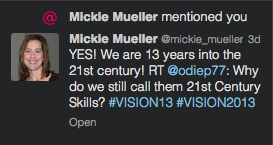
While at the ACTE VISION13 conference in Las Vegas this past week, I heard a lot about 21st Century Skills.  I posed the question on Twitter, “Why do we still call them 21st Century Skills?”  I got one response, but it made total sense.


I like the way that Mickie put it.  We are 13 years into the 21st Century, they are just skills that every student must have.  Not only for school and their career, but to be successful in life. I go back to the question at the beginning of this post and I will answer it myself in a different way.  To me the connotation of “21st Century Skills” is technology based.  But the skills that students need to be successful are more than technology skills.  Don’t get me wrong, technology skills are important, but so are many other skills that students need to be successful.  Collaboration, communication (verbal and non-verbal), critical thinking, and creativity don’t need technology.  Technology helps, but it isn’t necessary.

If you haven’t had a chance to look at the P21 organizations Framework for 21st Century Learning, you need to at least glance at it.  You can find it here.  This give you a good idea of the Skills that students need.

As for me, I am no longer going to refer to them as 21st Century Skills, they are now and forever more SKILLS.  If I happen to use this term, call me out and remind me of this post.  Take me to task, I am sure that I will deserve it.  

Thursday, November 14, 2013

The Common Core

I attended a workshop last week in Omaha about the Common Core State Standards (CCSS) from the Marzano Research Lab perspective.  I was confused about how the standards were organized, what they were saying and why they are the way they are.  In finding out the What and Why of the the CCSS helped me make more sense of them.  The standards may seem large and overwhelming, there are three parts, but only two of them are actually standards.  The third part is clarifying what can be done to achieve the standard.

The first part of the CCSS is the Anchor Standard.  Another term for this is the Culmination standard.  It is a K-12 Global Statement.  It is what all students in all grades should be aiming to achieve.  In English/Language Arts (ELA) there are 32 of these standards.  Ten each for reading and writing and six each for Speaking/Listening and Language.  In Math they vary per grade level and some carry over grade levels.  They are written differently than the ELA standards.  Overall in math there are eight standards for mathematical practice.

The next level of the standards in the ELA is Grade Level Standards(GLS).  These are the Benchmark standards.  What should students be able to do in each grade.  The final level in ELA is Clarifying Indicators.  These ARE NOT STANDARDS.  They are the details of how to better understand what is being asked in the Grade Level Standard.  The nuts and bolts of the GLS.

Prioritization is the key.  States and schools will need to decide what they want their students to learn to be college and career ready.    

I will be the first to admit that before this workshop, I was completely against having the CCSS in Nebraska. (Note: I was a part of the last revision of the Math Standards, so I have a “dog in the fight”.)  After two days of hearing about how the CCSS are organized, and all the resources that are out there I feel a little different.  Notice how I said “a little”, I am not completely sure that the entire CCSS is what Nebraska needs at this time or ever.  I do feel that in the next revisions, especially with the mathematics standards, that we need to look VERY closely at what the CCSS say in the math standards.  If we are expecting our Nebraska High School graduates to be college and career ready and able to compete with graduates from other states that have adopted the CCSS, we need to consider them in the revision of our Nebraska standards as well.  I still feel very passionate about Nebraska standards and state tests being written by Nebraska teachers.  Who better knows the students of Nebraska better than Nebraska teachers.

These are just my opinions and are open for discussion and debate. But I do feel, as stated earlier, that we at least need to consider some parts of the CCSS for Nebraska standards.  Maybe with some Nebraska “tweaks” to fit what we want to have our graduates College and Career Ready.

Wednesday, October 16, 2013

EdCamp Central Nebraska

Another wonderful day of FREE PD and networking has taken place.  EdCamp Central Nebraska took place at Grand Island High School this past Saturday.  About 50 people were in attendance for this very informative and fun day.  The Huskers game was followed on twitter using #Huskers.  It was nice to see a couple of other ESU7 teachers and even a student in attendance.  Craig Badura (@mrbadura) and Heather Callihan (@callihan) did a wonderful job planning this event.

The first part of the morning was spent planning the sessions.   If you wanted to present, you could, if not, you could participate.  One of the best parts of an EdCamp is the sessions are planned that morning.  Another one of the best parts, if you don’t like the session that you are in, get up and go to another one.  

I feel that the best sessions to attend are the ones that discussions happen in.  For example,  I led a session on “Being a Connected Educator”.  I started the session by saying what I though a connected educator was and then opened the floor up for more discussion.  As it turns out, there was one person in that session that wasn’t on Twitter.  He wasn’t sure it was for him, but from the discussion and asking questions he signed up later in the day.  The sharing of how, why and all the benefits we see from it convinced him to give it a try.  I don’t know that would have happened in a “sit-and-get” session.

Another great part of the day was being able to connect with other EdCamps going on the same day.  EdCamp Colorado, EdCamp Minneapolis-St. Paul, and EdCamp Dallas were all joined at some point with a Google Hangout.  (Side note: another great way to be a connected educator.)  

The networking before sessions started, during the sessions, during breaks, at lunch, and after session had finished is almost as good, if not better than the sessions themselves. (Another side note: Don’t do sit-down on a Husker game day at BW3’s or get lost on the way back to the EdCamp. Sorry those that were riding with me and @edcampcrane.)

I will keep going to as many EdCamps as I can (and my wife will let me) because it is such a valuable learning day.  Not just for the content, but as I have stated before, the networking.  So, if I am going to an EdCamp and you are going through Columbus or on the way: I will drive!